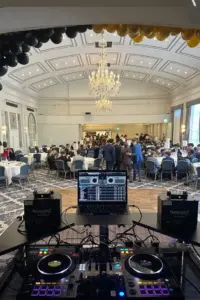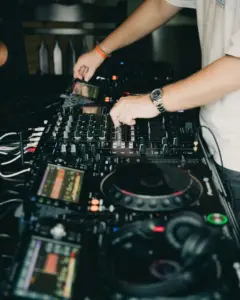

Planning a corporate event sound system in Miami starts with a question that has little to do with speakers: what should each part of the room sound like? A product unveiling, a VIP reception and a client dinner share one trait. Guests judge the evening partly by what they hear, even if they could not tell you why one event felt polished and another felt scratchy.
Walking through the room as a guest is a better way to plan than starting from an equipment list. The zones below follow that path, from the front door to the back row. Under each one, you will find the question to ask your DJ or audio provider, plus a few practical checks to run against your venue.
At the Door
The first sound guests meet shapes their expectations for the rest of the night. Music at the entrance should be present without being loud enough to compete with check-in staff, who need to hear names and give directions. A small speaker pair aimed at the arrival area, set at a modest level, usually does the job.
Think about hallway noise too. Doors that open onto a busy lobby or a loading corridor can bring in sounds you did not plan. Ask the venue where the nearest noise sources are, and place speakers so the music stays inside the event space. If a host will greet guests with a microphone at the door, test that microphone before arrivals, since the entrance is one of the first places a squeal of feedback would be noticed by everyone.
At the Bar and the Lounge Tables
This is where guests spend much of an event holding a drink and talking to people they want to impress. The music here has one job: make the space feel alive without making conversation hard. A good test is whether two people standing a few feet apart can talk at a normal speaking voice.
Several smaller speakers spread around a room often work better than a few big ones, because the sound stays even and no table sits right next to a loud cabinet. Ask your provider how they plan to cover seating areas, and where speakers will face. Sound aimed away from tables and toward the middle of the room keeps lounge corners comfortable. For a VIP evening, a softer sound level shows respect for the conversations that are the real purpose of the event.
At the Podium
If one zone decides whether an event sounds professional, this is it. A product presentation, a CEO’s remarks, or a host introducing a guest all depend on speech that is easy to understand. Intelligibility matters more than loudness. A moderately loud, clear voice beats a booming, muddy one.
Choose the microphone for the speaker. A handheld works for hosts who move around and for guests who prefer to hold one. A lapel microphone frees the hands of a presenter who gestures or handles a product. A headset suits someone who walks across a stage for a long time. Ask your provider which they carry and how many wireless channels are available.
Always run a sound check with the speaker in place. Ask the presenter to talk at their usual volume while someone walks the room. Keep loudspeakers in front of the microphone, not beside or behind it, since a mic that hears its own speaker will whistle. Keep a spare microphone ready with a fresh battery, and replace batteries before doors open. Show first-time speakers how far to hold a handheld mic, because a few inches changes the sound dramatically.

In the Back Row and the Corners
A system can sound great at the front and thin at the back. Long, narrow ballrooms and rooms with columns create dead spots, and a few seats near a speaker can get far too much sound. Before the event, have someone talk into a microphone while you walk every part of the room, including the corners, the area behind pillars, and the seats nearest the speakers.
Deep rooms often need extra speakers placed partway down the room, set with a small delay so the sound arrives together with the main system. Ask your provider whether they use them. The goal is an even blend, with nobody straining to hear and nobody wincing at the volume.
Near the Screen
Presentations bring video, and video brings audio problems. A clip often plays much louder than live speech, and a laptop connected the wrong way can produce a hum or no sound at all. Decide in advance who plays the presentation and how the audio travels from that laptop to the speakers.
Run a playback test with the actual files at the actual venue. Match the video volume to the speaking voice so nobody has to reach for a remote. If a presenter brings their own laptop, make time for a connection check in advance. Ask for a spare cable or adapter on site, since the right one is rarely the one in the presenter’s bag.
Between Indoors and Out
Many Miami venues blend interior and exterior space, with terraces, rooftops, courtyards, and pool decks. Outdoors, sound escapes in all directions, wind pushes voices around, and humidity can affect equipment. Rain, which can arrive fast in warmer months, calls for a plan to protect gear and move the event inside.
Check local rules for evening events, since outdoor sound can be restricted after a certain hour, especially near residential buildings. Ask your venue what those rules are and who enforces them. If guests move between spaces, ask how the audio will follow them. A speech that starts inside and continues on the terrace needs a mic that works across both and a plan for what the music does during the move.
Behind the Scenes
Guests never see this zone, and everything else depends on it. Power comes first. Ask where the sound system will plug in, whether it has its own circuit, and what happens if a breaker trips. Cables should run along walls or under covers, not across walkways where someone could trip.
Wireless microphones deserve extra attention in dense downtown areas such as Brickell and parts of the central business district, where many wireless devices operate at once. Ask your provider whether they scan for clear frequencies at the venue and how they handle interference. Label each microphone and keep spares of everything that can fail: cables, batteries, a backup microphone, and a second way to play music. A provider who answers these questions in detail has done this before.
Matching the Sound to the Brand
At a luxury launch or VIP reception, the audio should support the presentation without drawing attention to itself. Clear voices, subtle music, and nothing that rattles the glassware tend to feel right. The room’s look matters here, whether it is a jungle-inspired restaurant or a sleek hotel ballroom. Equipment that suits the space, such as slim speakers in dark finishes or well-placed stands, keeps the visuals clean and the sound strong. Share the mood and brand notes with your provider early so they can choose accordingly.
Questions to Ask Your Audio Provider
- Who will be on site, and how long have they worked corporate events?
- How many wireless microphones will you bring, and what types?
- How will you cover the whole room, including the back and corners?
- What do you carry as backup for microphones, power, and playback?
- How do you handle wireless interference at downtown venues?
- When can you arrive for setup and sound check?
- What happens if the event moves from outdoors to indoors?
- What is included in the quote, and what costs extra?
Planning Your Event With DJ Duni Entertainment

DJ Duni Entertainment is happy to talk through sound for your next company event in Miami, including microphones for speeches and music for each part of the evening. Our corporate event DJ service in Miami, FL, page explains our approach, and you can reach us at booking@djduni.com or +1 305-300-3785 to check a date.
A corporate event sound system Miami planners can trust is built zone by zone. Walk your venue with that in mind and the right questions appear on their own.
Frequently Asked Questions
What does a corporate event sound system include?
Typically, speakers, a mixer, microphones, cables and a way to play music or presentation audio. The size and layout depend on your guest count, room and program.
How many wireless microphones do I need?
It depends on how many people will speak and whether any will speak at the same time. List every speaker, plus a spare, and ask your provider to confirm the total in the quote.
Can one system cover a large ballroom evenly?
Often it can, with careful speaker placement and, in deep rooms, extra speakers set with a delay. Ask your provider how they plan to cover the back of the room and corners.
How do I prevent microphone feedback?
Keep loudspeakers in front of the microphone, test every mic at its speaking position and avoid pointing a mic toward a speaker. A sound check with the real speaker also helps.
Can I play video with sound at my event?
Yes. Test the video files and the connection before the event, and match the playback volume to the speaking voice.
Do outdoor events need different sound equipment?
Usually they need extra thought about wind, rain, power and local sound rules. Ask your provider about weather protection and a plan to move indoors.
How early should the sound team arrive?
Early enough for setup and a full sound check before guests arrive. Ask the venue for the load-in window and share it with your provider.
How do I contact DJ Duni Entertainment?
Email booking@djduni.com or call +1 305-300-3785 with your date, venue and guest count.